

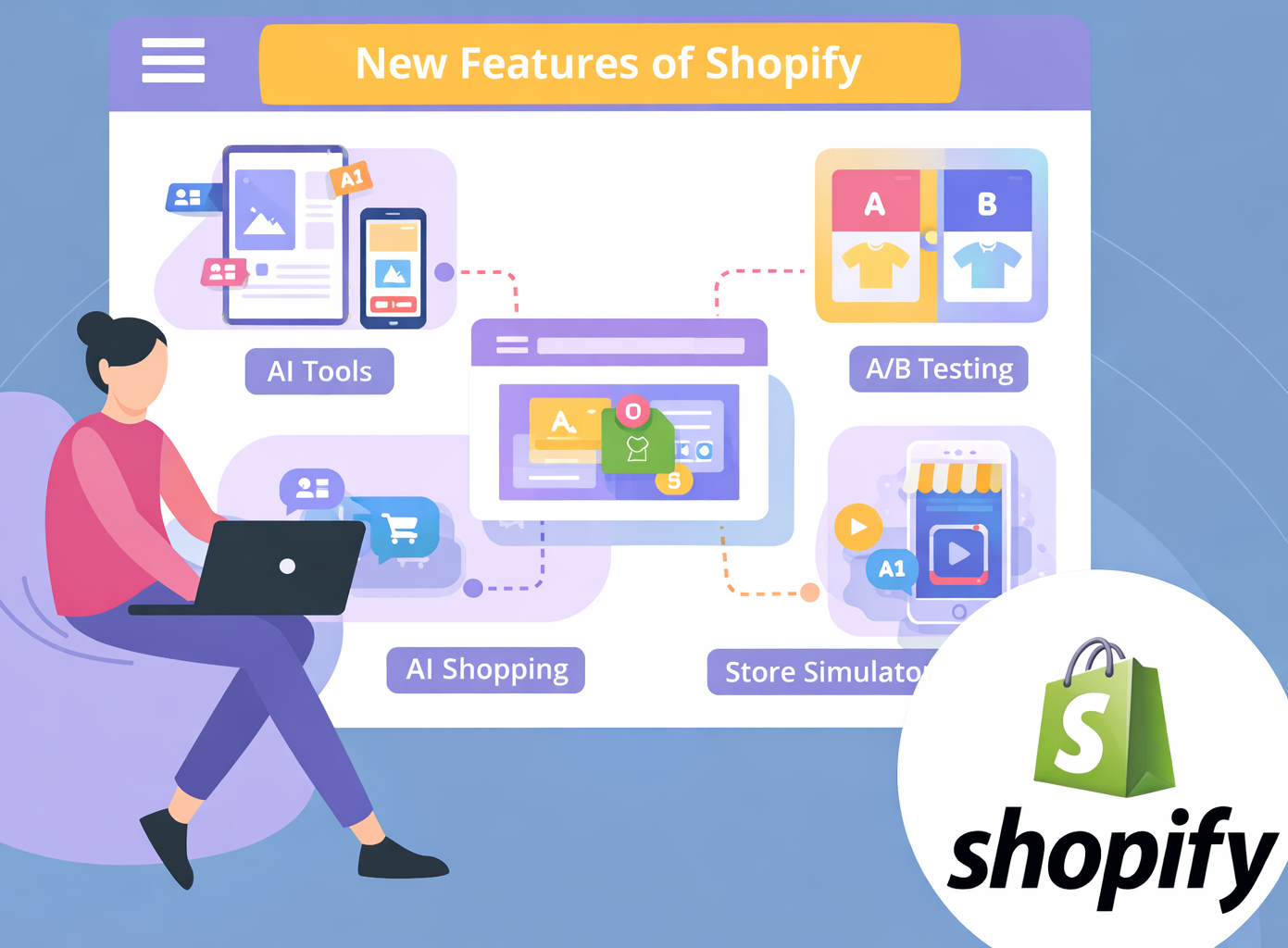
Updated on 15-May-2026
Table of Contents
- Shopify Agentic Dashboard
- Native llms.txt and agents.md files in Shopify
- Shopify AI Toolkit
- A/B Testing : Rollouts by Shopify
- Tinker by Shopify
- Shopify Agentic plan
- Shopify SimGym
- Shopify B2B for all plans
Shopify is the only e-commerce platform that rolls out new features and tools at breakneck speed.
At FirstWire, we are committed to bringing these updates to you first, so you can stay ahead of the competition.
Today, we are talking about some very important new features that Shopify has released in last few days.
|
Looking for help with your Shopify store? We are a Shopify Partner agency with 13 years of experience, having worked with more than 1,000 Shopify stores. We are the right partner to support you in scaling and growing your Shopify store. We provide end-to-end Shopify services, including store setup, design revamps, digital marketing, AI SEO, and ongoing monthly support. Our Monthly Support Services are ideal for implementing the latest Shopify features, handling regular updates, fixing issues, and managing day-to-day improvements for your store. You can explore these services at Shopify Monthly Support Retainer. If you are planning to upgrade your store and give it a complete design makeover, please take a look at our fixed-price packages at Shopify Upgrade & Design Revamp Offers. |
1) Shopify Agentic Dashboard
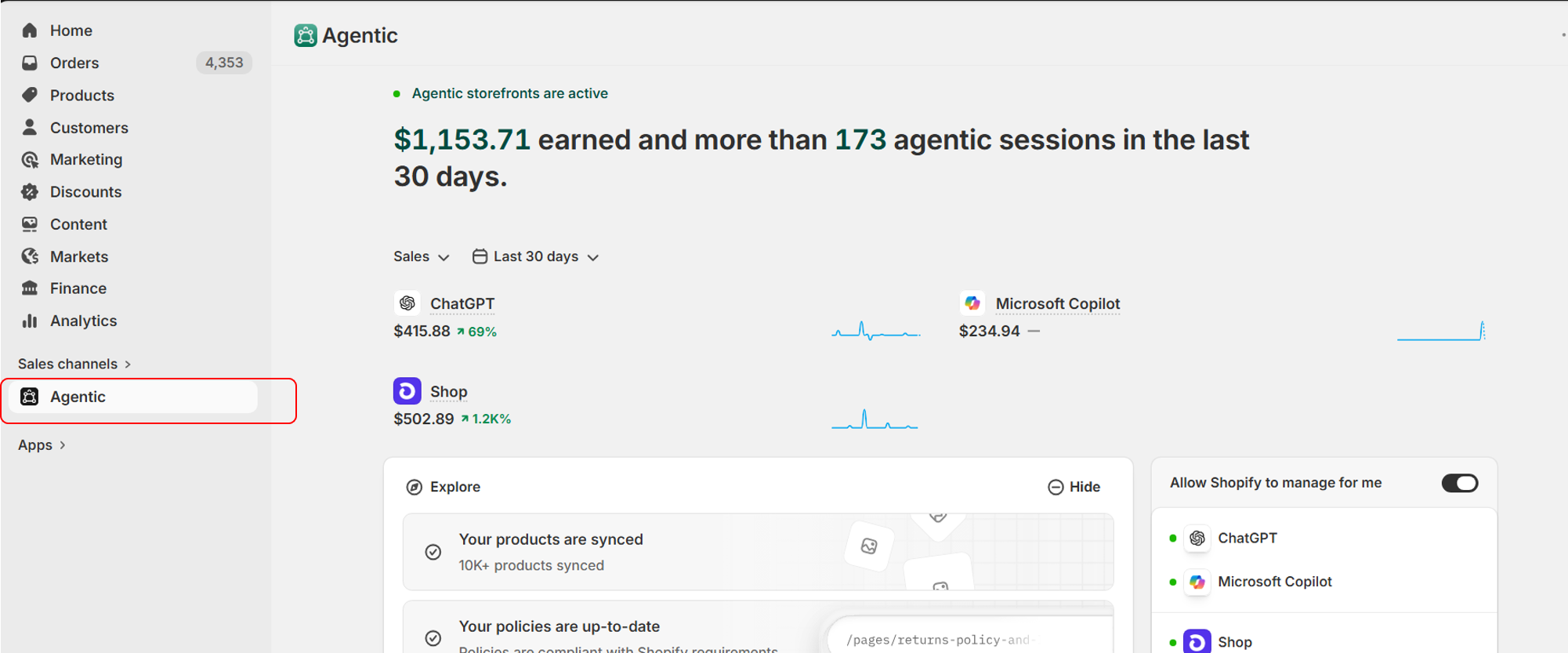
Shopify has launched a new Sales Channel and dashboard for Agentic Commerce, and it has now been rolled out to most Shopify stores.
With this new dashboard, merchants can:
- Track revenue generated from each Agentic Commerce or LLM platform.
- Choose whether to allow Shopify to manage different LLM and Agentic platforms on their behalf.
- View recent searches on LLM platforms where their products appeared.
- Check whether all products are synced with Shopify’s Universal Product Catalog.
- Run reports to measure store performance across Agentic Commerce platforms.
- Test how their Shopify catalog appears in Agentic Commerce by running sample queries.
This is an important update for Shopify merchants because it gives them better visibility into how their products are being discovered, displayed, and sold through AI-powered shopping platforms.
2) Native llms.txt and agents.md files in Shopify
llms.txt files and associated agentic commerce features to all stores. This initiative aims to make Shopify storefronts “AI-ready” by providing a standardized format for LLMs (like ChatGPT, Gemini, and Claude) to crawl, understand, and index product data, policies, and store information.llms.txt and agents.md Files- Automatic Generation: Shopify is automatically generating
/llms.txtandagents.mdfiles for stores, allowing AI bots to better understand the site structure. - Platform-Level Integration: Rather than requiring third-party apps, this functionality is built into the platform, setting a standard for how AI agents interact with product data.
- Content: The files typically include metadata, currency, contact details, and links to search or product collections.
- AI Discovery: This rollout helps merchants get their products discovered through AI-powered search engines, allowing shoppers to find products in ChatGPT or Gemini and, in some cases, buy them immediately via agentic AI checkout.
- Native
llms.txt&agents.md: The files now populate automatically, enabling LLMs to understand the site structure, content, and products better. - Shopify Sidekick: Shopify continues to enhance its native AI assistant, Sidekick, which helps merchants manage their stores through natural language.
- Privacy Alert: Some merchants have reported that the automated
llms.txtfile might expose backend contact information (personal phone numbers or emails) if not properly configured. - Control & Editing: Currently, the files are primarily auto-generated, but there are calls for better editing controls.
yourstore.com/llms.txt and yourstore.com/agents.md
3) Shopify AI Toolkit
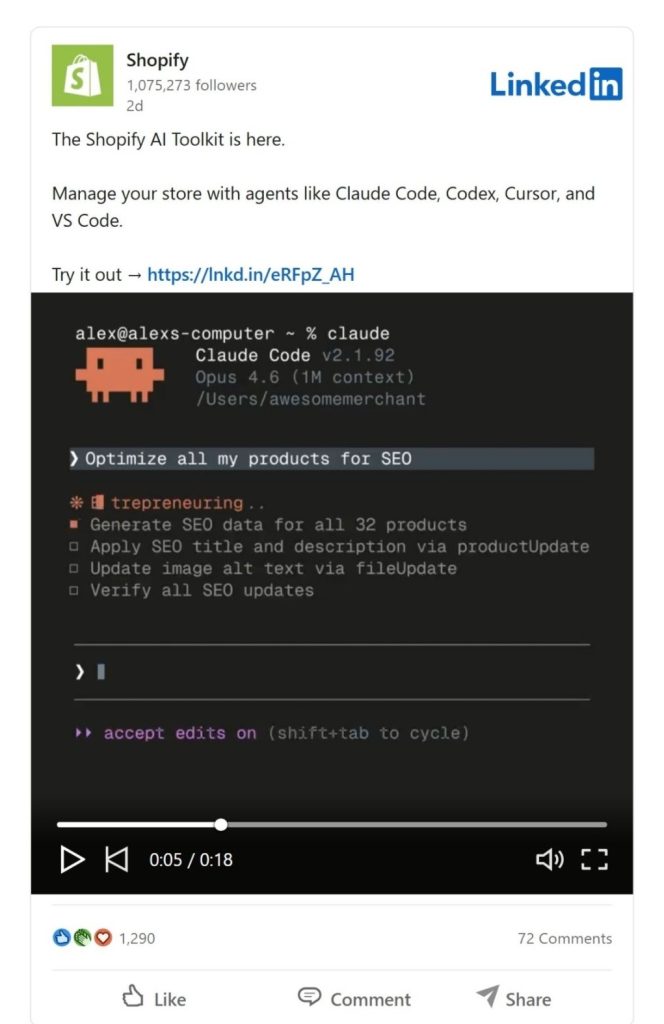
The Shopify AI Toolkit is a significant shift in how store owners and developers interact with the platform. Instead of navigating the traditional Shopify Admin dashboard, it allows you to manage your store using AI agents (like Claude Code, Cursor, or Gemini) through natural language commands.
How it Works
The toolkit acts as a “bridge” between external AI coding agents and your Shopify store. It leverages the Model Context Protocol (MCP) to give AI tools direct, real-time access to your store’s backend.
-
Connectivity: You install the toolkit as a plugin in tools like Claude Code, Cursor, VS Code, or Gemini CLI. This connects the AI agent directly to Shopify’s APIs.
-
Live Documentation Access: Unlike standard AI (which might rely on outdated training data), this toolkit gives agents access to real-time Shopify documentation. The AI always knows the latest API versions and Liquid syntax.
-
Schema Validation: Before any change is made, the toolkit validates the code (GraphQL, Liquid, or UI extensions) against Shopify’s actual live schemas. This prevents the AI from making syntax errors or suggesting deprecated fields.
-
Store Execute (Actionable AI): This is the core engine. It allows the AI to actually execute commands via the Shopify CLI. When you tell the AI to “Update all prices,” it doesn’t just write the code; it performs the authenticated operation on your live store.
How it Helps Shopify Merchants
This toolkit moves AI from being a “chat assistant” to an “operational partner.”
A. Massive Time Savings on Bulk Tasks
Common manual tasks that used to take hours can now be done in seconds via a single prompt:
-
“Update all product descriptions in the ‘Summer’ collection to be more SEO-friendly and mention our 2-year warranty.”
-
“Apply a 15% discount to every item that hasn’t sold in the last 60 days.”
-
The AI handles the filtering, logic, and execution in one go.
B. Accessibility for Non-Technical Merchants
While the toolkit is currently developer-focused (running in terminals/editors), it empowers merchants who aren’t experts in GraphQL or Liquid. You can describe a complex change in plain English, and the toolkit ensures the AI translates that into perfectly formatted, validated code that won’t break your site.
C. Reduced Error Rates
Because the toolkit uses Real-Time Validation, it catches mistakes before they reach production. It prevents “hallucinations” (where AI makes up code that doesn’t exist) because the agent is “anchored” to your store’s specific rules and Shopify’s latest requirements.
D. Faster Development & Lower Costs
For merchants working with developers or agencies, this toolkit significantly speeds up the development cycle. Developers can prototype features, build custom apps, or fix theme bugs much faster. What used to be a 10-hour project might now take 2 hours, potentially lowering the cost of store maintenance and customization.
4) A/B Testing : Rollouts by Shopify
Rollouts is Shopify’s built-in tool for scheduling, staging, and testing storefront changes directly inside the Shopify admin. It lets merchants prepare theme updates in advance, launch them at a specific time, run experiments with real store traffic, and automatically roll changes back when needed. Shopify says it is now available to all merchants.
How it works
With Rollouts, a merchant can create changes to the storefront without pushing them live immediately. Those changes can be scheduled for a future date and time, used for short-term campaigns like flash sales, or tested as variations to see which version performs better with real visitors. Shopify presents Rollouts as a centralized system for managing, scheduling, and testing online store changes before publishing them.
How it can help Shopify merchants
For Shopify merchants, Rollouts can help in several practical ways:
- Safer theme changes – Merchants can prepare updates in advance instead of editing the live store at the last minute, which reduces the risk of mistakes during important campaigns.
- Schedule launches and promotions – It is useful for flash sales, seasonal campaigns, product launches, and limited-time offers because changes can go live automatically at the right time.
- A/B testing with real traffic – Merchants can test storefront variations with actual visitors and measure performance, helping them make decisions based on data rather than guesswork.
- Automatic rollback – If a promotion or temporary design change is only needed for a fixed window, merchants can set it to roll back automatically, which saves manual work.
- Better conversion optimization – This helps merchants improve design, messaging, or campaign timing by learning what actually works with customers before making permanent changes.
- More accessible than custom testing setups – Since the feature is built into Shopify admin, merchants may not need separate scheduling tools or external A/B testing apps for some common storefront experiments.
5) Tinker by Shopify
Tinker is Shopify’s new free mobile app that brings together 100+ AI tools in one place for creating things like product photography, logos, social media videos, and 360-degree product visuals. Instead of making users learn complex prompts or pay for multiple AI subscriptions, Tinker organizes tools by outcome – what you want to create – and handles the prompting in the background. It is available on iPhone and Android.
How it works
The app is designed to be simple for non-technical users. A merchant chooses a goal such as product photography or logo creation, enters a plain-language description, and Tinker generates the output. Shopify says the app uses models from providers like OpenAI, Google, and Anthropic, while keeping the experience inside one guided interface. It also keeps creations in one environment so brand and visual continuity are easier to maintain across assets.
How it can help Shopify merchants
For Shopify merchants, Tinker can be useful in several practical ways:
- Faster content creation – Merchants can generate product photos, promo visuals, and social media content much faster than traditional creative workflows.
- Lower marketing cost – Professional product photography and design work can be expensive, while Tinker can help merchants create a large number of visuals at a much lower cost.
- Easier for small teams and solo founders – A merchant does not need deep design skills, prompt-writing skills, or multiple subscriptions to different AI tools.
- Better speed to launch – Merchants can go from idea to usable brand assets in minutes, which can help when launching a new store, new product, or campaign.
- Helps with experimentation – Because the app is free and easy to use, merchants can test multiple creative directions before spending heavily on agencies, designers, or photoshoots.
- Useful for ongoing store growth – It is not just for launch. Merchants can use it continuously for new banners, social content, product imagery, ad creatives, and seasonal campaigns.
6) Shopify Agentic plan
Shopify’s Agentic plan is a new commerce offering that lets merchants surface real-time product data in AI channels and allow customers to complete purchases directly inside AI conversations. Shopify positions it as a way to sell through channels like ChatGPT, Google AI Mode and Gemini, Copilot, Perplexity, and the Shop app – even without needing a traditional Shopify online store. It has no monthly fee, and Shopify says merchants only pay when products sell, with card rates starting from 2.9% + 30¢.
How it works
Products become discoverable in ChatGPT by default via Agentic Storefronts, with no separate integrations, no apps, and no transaction fees beyond standard processing rates.
(However you need to make sure that your products are compliant with Shopify’s agentic storefront requirements. Please contact us to get your store audited for this.)
Once connected, Shopify can syndicate real-time product data to supported AI surfaces. The platform is also designed to work with a merchant’s existing systems, including PIMs, tax systems, and order management systems, so businesses do not necessarily have to replace their existing stack to participate.
How it can help Shopify merchants
For Shopify merchants, the Agentic plan can help in several practical ways:
- Sell in AI conversations – Merchants can meet customers where discovery is increasingly happening, inside AI assistants and chat-based interfaces, instead of relying only on a standard website.
- Real-time product visibility – Shopify says product data can be surfaced in real time across multiple AI channels, which can help shoppers see current product information instead of outdated catalog content.
- Checkout inside the conversation – Customers can move from product discovery to purchase without leaving the AI chat, which can reduce friction in the buying journey.
- Works with existing business systems – Merchants can keep their current tech stack while using Shopify to power AI-channel commerce, which may reduce the complexity of adoption.
- Better control over AI brand answers – Shopify highlights the Knowledge Base app as a way for merchants to understand what buyers are asking and provide approved answers about shipping, returns, and other store policies. This can help merchants shape how their brand appears in AI responses.
7) Shopify SimGym
Shopify SimGym is a Shopify app that lets merchants simulate storefront changes using AI shoppers with human-like personas before launching those changes live. It is designed to help merchants test redesigns, campaigns, and theme variations in a lower-risk way by showing how virtual shoppers may navigate the store, respond to changes, and move toward actions like add-to-cart. Shopify currently describes it as being in AI Research Preview.
How it works
SimGym runs simulations with AI shoppers that behave like different customer personas on your storefront. A merchant can test proposed changes and review how those AI shoppers interact with navigation, product discovery, and conversion paths. The app is positioned as a way to compare storefront experiences and get recommendations before changes go live. Pricing is free to install, with charges per simulation run.
How it can help Shopify merchants
For Shopify merchants, SimGym can help in several practical ways:
- Test changes before launch – Merchants can evaluate theme updates, redesigns, or bold campaign ideas before exposing real shoppers to them.
- Reduce launch risk – Instead of guessing how visitors may behave, merchants can use AI simulations to catch usability or navigation issues earlier.
- Get insights into shopper behavior – Shopify says the tool can show likely impact on add-to-cart behavior, navigation patterns, and related storefront interactions.
- Improve UX decisions – The persona-based approach can help merchants think through how different kinds of shoppers might experience the site.
- Useful for bigger redesigns – The app appears especially relevant when merchants are making major theme or storefront changes and want more confidence before launch.
8) Shopify B2B for all plans
Shopify has expanded its native B2B features to merchants on Basic, Grow, and Advanced plans at no extra cost. This means more merchants can now manage both wholesale and direct-to-consumer sales from one Shopify platform instead of relying on separate apps, plugins, or manual workarounds.
How it works
Merchants can now use built-in B2B tools such as company profiles for wholesale buyers, up to three custom catalogs with tailored pricing, volume discounts, quantity rules, vaulted credit cards, and payment terms. Shopify says these features are designed to let merchants run wholesale and retail from one unified admin and one source of truth.
How it can help Shopify merchants
For Shopify merchants, this can help in several practical ways:
- Manage B2B and DTC in one place – Merchants can run wholesale and retail operations from the same store and admin instead of juggling disconnected systems.
- Offer custom pricing to wholesale buyers – Merchants can create catalogs with tailored pricing, quantity rules, and volume discounts for different business customers.
- Reduce manual work – Shopify highlights that native B2B can reduce phone, email, and back-office work by allowing wholesale customers to browse, order, and reorder on their own.
- Improve repeat ordering – Shopify says merchants using Shopify B2B have seen up to a 4.1x increase in reorder frequency compared to DTC orders, and up to a 20% increase in reorder frequency after adopting Shopify B2B.
- Increase self-serve ordering – Shopify reports that merchants who adopt Shopify B2B can see up to a 33% increase in self-serve orders within six months.
- Help merchants grow into wholesale – This is especially useful for brands that already get bulk or reseller interest and want to turn that into a more structured revenue channel without moving to another platform.
|
We are a Shopify Partner agency with 13 years of experience, having worked with more than 1,000 Shopify stores. We are the right partner to support you in scaling and growing your Shopify store. We provide end-to-end Shopify services, including store setup, design revamps, digital marketing, AI SEO, and ongoing monthly support. Our Monthly Support Services are ideal for implementing the latest Shopify features, handling regular updates, fixing issues, and managing day-to-day improvements for your store. You can explore these services at Shopify Monthly Support Retainer. If you are planning to upgrade your store and give it a complete design makeover, please take a look at our fixed-price packages at Shopify Upgrade & Design Revamp Offers. |